Modern Amateur Radio
Logging Made Simple

Cloudlog is a free, open-source web-based amateur radio logging application designed for ham radio operators worldwide. Track your contacts, manage awards, and sync with LOTW, QRZ, Clublog, and eQSL, all from your browser, no desktop apps required.

100%
Free & Open Source
Global
Ham Community
Self-Hosted
Your Data, Your Server
Cloudlog v2.8.21
$ git clone https://github.com/magicbug/Cloudlog
Cloning into 'Cloudlog'...
✓ Web-based logging interface
✓ LOTW, eQSL, QRZ integration
✓ Awards tracking
✓ Real-time statistics
$ _

Everything You Need to Log Your Contacts

Powerful features designed for serious amateur radio operators

🛰️

Built for satellite logging

Cloudlog focuses on getting satellite QSOs right in your logbook. Log the satellite name and mode, filter statistics and grid maps by satellite, and see VUCC summaries on the dashboard (including satellite contacts). Export satellite QSOs to LoTW, and use built-in Hamsat and pass timer pages that show data from external services at your grid. Cloudlog does not predict passes itself; pair it with your usual tracking software, including through Aurora.

Web-Based Interface

Access your logbook from anywhere with a modern, responsive web interface. No desktop software required.

Self-Hosted & Secure

Keep complete control of your data by hosting Cloudlog on your own server or shared hosting.

Real-Time Lookups

Instant callsign lookups using QRZ, HamQTH, and other services. Auto-populate QSO details as you log.

Multi-Station Support

Manage multiple stations, locations, and radio configurations all from one installation.

Built-In Bandmap

Visual bandmap display of cluster spots, just like your desktop apps. See band activity at a glance and spot rare DX.

LOTW & eQSL Integration

Upload and download directly from your browser. No TQSL desktop app needed! Cloudlog handles LOTW, QRZ Logbook, Clublog, and eQSL seamlessly.

DX Cluster Support & Spotting

Connect to DX Cluster networks for real-time spotting and band activity. See rare DX spots, check if callsigns have been worked, and enhance your DX hunting through the built-in bandmap and cluster connections.

Awards Tracking

See your progress towards DXCC, WAS, IOTA, and other popular awards from the contacts in your logbook.

Statistics & Analytics

Visualize your radio activity with detailed statistics, maps, and charts. Generate monthly activity reports and filter by custom date ranges for contests and activations.

Import & Export

Import from ADIF files or export your logs. Compatible with other popular logging software.

Personal Data Backup & Restore

Create complete backups of your station data, logbooks, and QSOs in a single JSON+ZIP file. Preview before restoring to manage conflicts safely.

Collaborative Logbook Sharing

Share your logbooks with other Cloudlog users with granular permissions. Set Admin, Write, or Read access levels and manage collaborators easily.

Logbook Embedding

Showcase your logbook on external websites with embed code. Perfect for QRZ profiles, personal websites, or blogs, and share your activity with the world.

OQRS - Online QSL Request System

Let other operators request QSL cards directly through your Cloudlog installation. Manage QSL requests, print labels, and streamline your card confirmation workflow.

REST API

Integrate Cloudlog with your own applications and tools using the comprehensive REST API. Access QSO data, manage logbooks, and build custom integrations.

LOTW
QRZ
Clublog
eQSL
Your Browser

Everything Happens in Your Browser

Forget about installing and configuring multiple desktop applications. Cloudlog handles all uploads and downloads directly from your browser.

  • No TQSL Desktop App

    Upload and download LOTW confirmations directly in Cloudlog, with no separate software needed

  • Unified Interface

    Manage QRZ Logbook, Clublog, and eQSL all from one place

  • Automatic Synchronisation

    Keep your logs in sync across all services with just a few clicks

  • Works Anywhere

    Access from any computer, whether that is your laptop, tablet, or even your phone

Collaborative Logging Made Simple

Cloudlog makes it easy to share logbooks with other operators, whether you're working on a special event station, managing a club station, or simply want to collaborate with fellow hams.

  • Granular Permissions

    Control access with Admin, Write, or Read-only permissions for each collaborator

  • Easy Management

    Add or remove collaborators by email or callsign directly from logbook settings

  • Public Embedding

    Generate embed code to showcase your logbook on QRZ profiles, websites, or blogs

  • Automatic Notifications

    Collaborators receive email notifications when granted access to shared logbooks

Shared Logbook
Admin
Write
Read

Handy for special event stations, club shacks, and anyone who wants to share a logbook without handing over the keys.

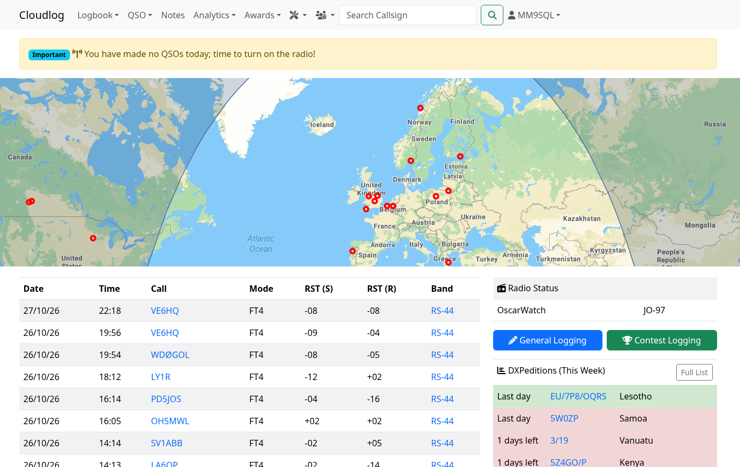
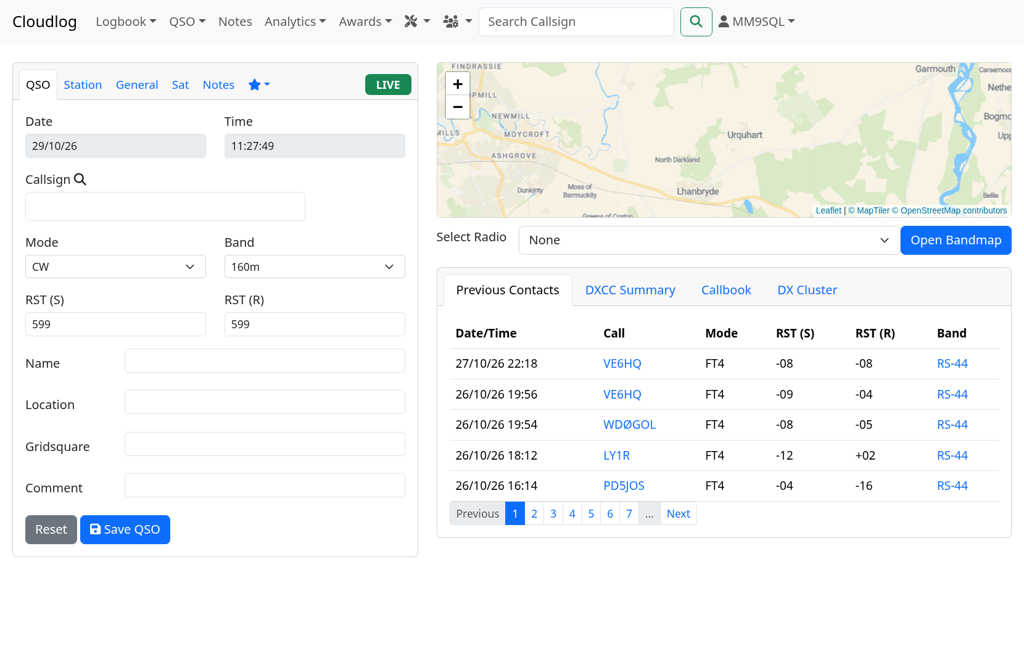
See Cloudlog in Action

A modern interface designed for efficiency and ease of use

🎯 Intuitive Design

Clean, modern interface that gets out of your way so you can focus on making contacts.

📱 Fully Responsive

Works beautifully on desktop, tablet, and mobile devices. Log contacts from anywhere.

⚡ Lightning Fast

Optimised performance means quick lookups and instant logging, even on slower connections.

Born from a Real Need

Every great project starts with a problem that needs solving. For Peter Goodhall, MM9SQL, that problem was managing logs across multiple radio shacks and locations.

💡

2010 - The Beginning

Cloudlog started life as "HRD Frontend", created to provide a web frontend to the Ham Radio Deluxe logbook MySQL database. Peter needed a way to log QSOs whilst operating from G4AZN, G6PZ, and other locations when he wasn't at home. The problem: no unified logging solution that worked everywhere.
Cloudlog Logo

2011 - A New Name

Gavin, M1BXF, convinced Peter to rename the project "Cloudlog", a name that better captured the essence of cloud-based amateur radio logging. The project began to take on its own identity, independent of any desktop application.

🚀

2020 - LoTW Breakthrough

A major milestone: Cloudlog became one of only two online services capable of uploading directly to Logbook of the World. This breakthrough eliminated the need for desktop TQSL software and positioned Cloudlog as a truly comprehensive web-based logging solution.

🌍

Today - A Global Community

What started as a personal tool has evolved into a comprehensive logging platform used by operators worldwide. With contributions from developers and enthusiasts globally, Cloudlog continues to innovate whilst remaining free and open source for all.

Cloudlog Today

📡
Global
Operators Worldwide
🔄
Active
Development
👥
Community
Driven Project
💯
Free
Always & Forever

Cloudlog began as Peter Goodhall MM9SQL's own logging setup and grew with help from amateurs around the world. It stays free, open source, and aimed at practical operating.

Peter Goodhall, MM9SQL Creator of Cloudlog

Ready to Get Started?

Choose the option that works best for you

Free & Open Source

Self-Hosted

Download and host Cloudlog on your own server or shared hosting. Complete control of your data and installation. Perfect for those comfortable with web hosting.

✓ 100% Free forever
✓ Full control of your data
✓ Host anywhere you like
✓ Community support

Requirements:

  • Linux-based operating system
  • Apache web server (Nginx should work too)
  • PHP 8.5 (current stable release)
  • MySQL 5.7 or higher

Logging microwave QSOs requires a 64-bit operating system. Docker is not officially supported, but you are welcome to use it if you wish; the project team will not handle Docker support requests.

Managed Cloudlog

Hosted Instance

Get a fully managed Cloudlog instance with automatic updates, backups, and professional support. Hosted and maintained by Magicbug, Peter, MM9SQL's company. Start logging immediately with no technical setup required.

✓ Setup in hours - no technical knowledge needed*
✓ Automatic updates and backups
✓ Professional support
✓ High-performance infrastructure*
* Setup typically completes within hours, but may take up to 24 hours depending on demand.
Managed Cloudlog is hosted in the United Kingdom.
Perfect for operators who want to focus on radio, not server management.

Quick Start

1

Download Cloudlog

Get the latest release from GitHub or clone the repository

2

Upload to Your Server

Extract and upload files to your web hosting

3

Run the Installer

Navigate to your Cloudlog installation in a web browser. The installer will run automatically and guide you through setup

4

Start Logging!

Follow the installer to configure your database, then access the web interface and begin tracking your contacts

Bridge the Gap Between Hardware and Web

Cloudlog Aurora is the desktop companion application that connects your physical radio equipment and favourite desktop applications directly to your Cloudlog installation. It runs on Windows today, with Mac and Linux versions coming soon.

📻

Radio Control (CAT)

Connect your transceiver directly to Cloudlog. Automatic frequency, mode, and band detection as you tune across the bands. Aurora uses Hamlib to provide comprehensive radio support.

🛰️

Satellite software integration

Link SatPC32 or CSN Technologies S.A.T. through Aurora so satellite name and grid details flow into Cloudlog while you operate. Aurora carries data from your tracking setup; it does not predict passes for you.

💻

WSJT-X Integration

Seamlessly log FT8, FT4, and other digital mode contacts from WSJT-X directly into Cloudlog in real-time.

🔗

Application Bridge

Acts as a bridge between desktop logging applications and your web-based Cloudlog, giving you the best of both worlds.

⚡

WinKey Support

Key CW from Aurora with WinKey-compatible interfaces, so your station and Cloudlog stay in step when you are sending Morse.

🔄

Rotator Control

Point your beam from Aurora when your rotator is connected, keeping antenna heading alongside the rest of your station data in Cloudlog.

Cloudlog Cloudlog
AuroraCloudlog Aurora
WSJT-X
Radio CAT
SatPC32
More Apps

Aurora links your radio, satellite tools, and digital modes to the Cloudlog you already use in the browser.

Join the Community

Cloudlog is built by ham radio operators, for ham radio operators

Contribute on GitHub

Report bugs, request features, or contribute code to make Cloudlog even better.

Visit Repository →

Documentation

Comprehensive guides and documentation to help you get the most out of Cloudlog.

Read Docs →

Get Support

Join discussions, ask questions, and connect with other Cloudlog users worldwide.

Join Discussion →

Help Make Cloudlog Better

Cloudlog is maintained by volunteers who are passionate about amateur radio. Your contributions, whether that is code, documentation, or financial support, help keep the project thriving.

Learn How to Contribute